
HubSpot Xero integration for when the standard sync is not enough
A HubSpot Xero integration should let sales see what finance sees. We start with HubSpot’s own Xero sync, then build the rules it cannot cover for your business.

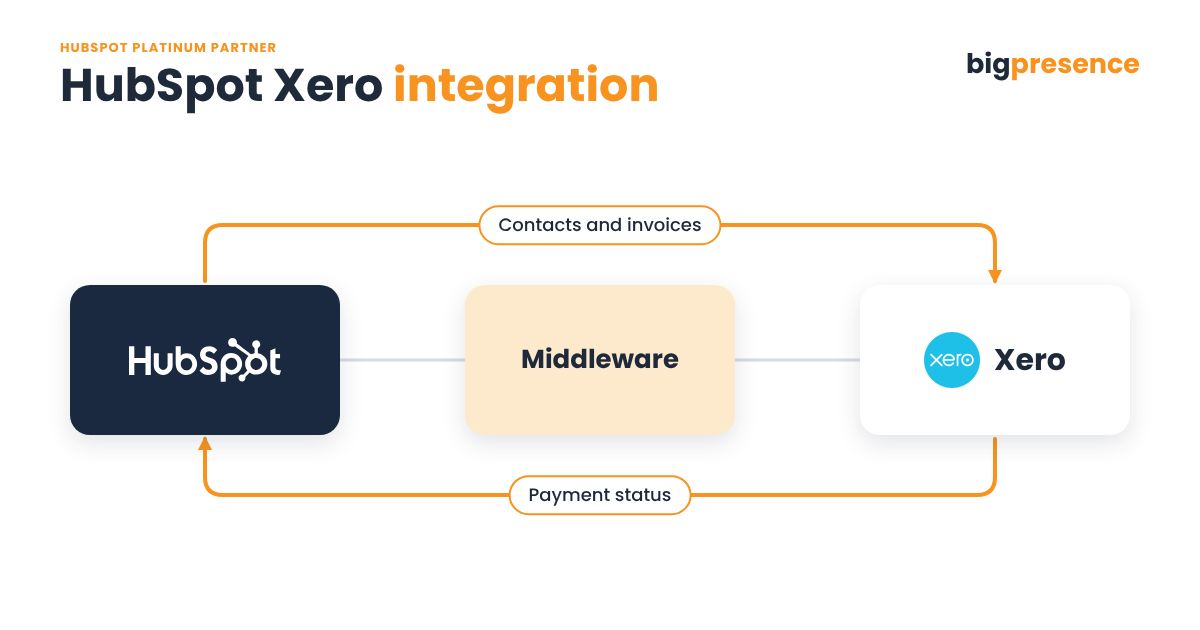
What is a HubSpot Xero integration?
A HubSpot Xero integration connects HubSpot, where sales manage deals and contacts, to Xero, where finance manages invoices and accounts. HubSpot’s own Xero sync moves contacts, products, invoices and payments. Big Presence, a HubSpot Platinum Solutions Partner, starts with that native sync and builds custom middleware only where your process needs it.
- Who builds it: Big Presence, a HubSpot Platinum Solutions Partner. Xero is in our partner network.
- Native sync: HubSpot’s Xero data sync covers contacts, products, invoices and payments.
- Sync timing: HubSpot says changes reach Xero within a few minutes, and Xero changes reach HubSpot every 30 minutes.
- Our own use: our Stripe payments come into HubSpot and sync to Xero. We run this ourselves.
- Price: fixed once scoped. New scope gets a new estimate.
- After launch: we host and support it, or hand over the working code.
Last reviewed
Why connect Xero to HubSpot?
When HubSpot and Xero disagree, sales and finance ask each other what the systems should show.
“Has this client paid?”
Account managers cannot easily tell from HubSpot whether an invoice is paid, so they ask finance.
Contacts that will not match
The same client is spelt one way in HubSpot and another in Xero. As a result, records fail to sync or end up duplicated.
More than one Xero account
Your group runs separate Xero accounts, and each invoice has to land in the right one.
Invoices built by hand
You bill on usage, so someone works out each invoice in a spreadsheet first.
What does HubSpot’s native Xero sync do?
HubSpot offers its own Xero data sync. In fact, for many businesses looking for a Xero CRM integration, it is the right place to start. Here is what HubSpot’s Xero documentation says.
What it syncs
Contacts, products and invoices can sync in either direction or both. Payments, meanwhile, can sync from Xero to HubSpot, or both ways.
How often
HubSpot says changes from HubSpot to Xero are picked up within a few minutes. However, changes from Xero to HubSpot are picked up every 30 minutes. There is also a manual sync option.
Invoice rules
Draft invoices do not sync to Xero. Instead, invoices must be open. Invoices created in HubSpot should be edited in HubSpot, not Xero.
Contact rules
An invoice needs its contact in both systems. HubSpot notes that syncs often fail when the email does not match the Xero customer, and Xero contact names must be unique.
Creating custom field mappings needs Data Hub Starter or above. In addition, six currencies are supported, including pounds sterling.
When does a HubSpot Xero integration need custom work?
The native sync follows fixed rules. However, some businesses need different ones. These are the flows we design for. We then confirm each one at scoping.
| From | To | What moves | Direction |
|---|---|---|---|
| Stripe, through HubSpot | Xero | Payment records, matched to the right Xero contact | One way |
| Xero | HubSpot | Payment status shown on the deal or company | Back to HubSpot |
| HubSpot | Xero | Invoices built from usage data | One way |
| HubSpot | Two Xero accounts | Each record sent to the right Xero account | One way |
| HubSpot | Xero | Contacts matched by rules you agree, not just email | Two way |
We connect the two through their APIs. An API is the doorway one system uses to read and write data in another. Xero publishes its developer documentation, and HubSpot has its own developer API.
How is a custom HubSpot Xero integration built?
Scope
First, we check whether the native sync will do the job. If it will not, we agree what the custom build covers and fix the price.
Map
We agree how contacts match, which system owns each field and where each invoice should go.
Build and test
Next, we build the middleware and test it against a test account where possible. Then your team tests it.
Host and support
Finally, after go live we keep watch. When a record fails to sync, we find out why and put it right.
Does Big Presence run a HubSpot Xero integration itself?
Our own Stripe payments come into HubSpot and sync to Xero. Because we run this ourselves, we deal with the same questions our clients do: which contact a payment belongs to, and how finance and sales see the same record.
Xero is part of our partner network, alongside HubSpot.
Why choose Big Presence for a HubSpot Xero integration?
We are a revenue operations partner, not just a HubSpot implementer.
Partners on both sides
We are a HubSpot Platinum Solutions Partner, based in Wilmslow, Cheshire. Xero is in our partner network.
Native first
We use HubSpot’s own Xero sync where it fits. Then we build custom logic only where your process needs it.
Built to survive change
Our integrations run through a middleware layer. So if Xero or HubSpot changes its API, we update the middleware instead of rebuilding.
Who hosts and supports a HubSpot Xero integration?
We host it
We host the middleware and look after it. That includes monitoring it, fixing breakages, handling API changes and rotating keys.
You host it
Rather run it yourself? We hand over the working code and the repository.
Ongoing support is through a monthly support package: Big, Bigger or Biggest. We also suggest the right level when we scope.
HubSpot Xero integration FAQs
Does HubSpot have a native Xero integration?
HubSpot offers a native Xero data sync for contacts, products, invoices and payments. If it covers what you need, use it. We build custom work only where it falls short.
How much does a HubSpot Xero integration cost?
A HubSpot Xero integration typically costs between £3,000 and £8,000 plus VAT when it connects one system to HubSpot, and between £10,000 and £30,000 plus VAT for multi-system builds or complex two-way logic. Most go live in 3 to 8 weeks. We confirm a fixed price once the project is scoped, and new scope gets a new estimate.
How long does it take?
The timeline for a HubSpot Xero integration depends on how many systems, accounts and rules are involved. We give you a timeline after scoping. Every project follows the same stages: scope, map the data, build and test, your testing, go live, then ongoing support.
Why do some contacts fail to sync to Xero?
HubSpot’s documentation says a common cause of contacts failing to sync to Xero is an email that does not match the Xero customer. Xero contact names must also be unique. We help you clean up and agree matching rules before anything syncs.
Can you connect two Xero accounts to HubSpot?
Big Presence can connect two Xero accounts to one HubSpot portal. We look at how your Xero accounts are set up during scoping and design the middleware so each record reaches the right one.
Can I see in HubSpot whether an invoice has been paid?
HubSpot’s native Xero sync can bring payments from Xero into HubSpot. If you need payment status on the deal or company, or in your sales reports, we can build that.
What do you need from us to get started?
To start a HubSpot Xero integration, we need access to the software, API documentation or credentials, a test account where possible, and information within 5 working days of asking.
Ready to get sales and finance on the same page?
Book a scoping call. Then we will look at your HubSpot and Xero setup and tell you whether the native sync is enough or where a custom build would help.