
PandaDoc HubSpot integration that brings the signature home
A PandaDoc HubSpot integration lets you send contracts from HubSpot, then get the signed details back onto the right deal, in the right fields, without copying them across.

What is a PandaDoc HubSpot integration?
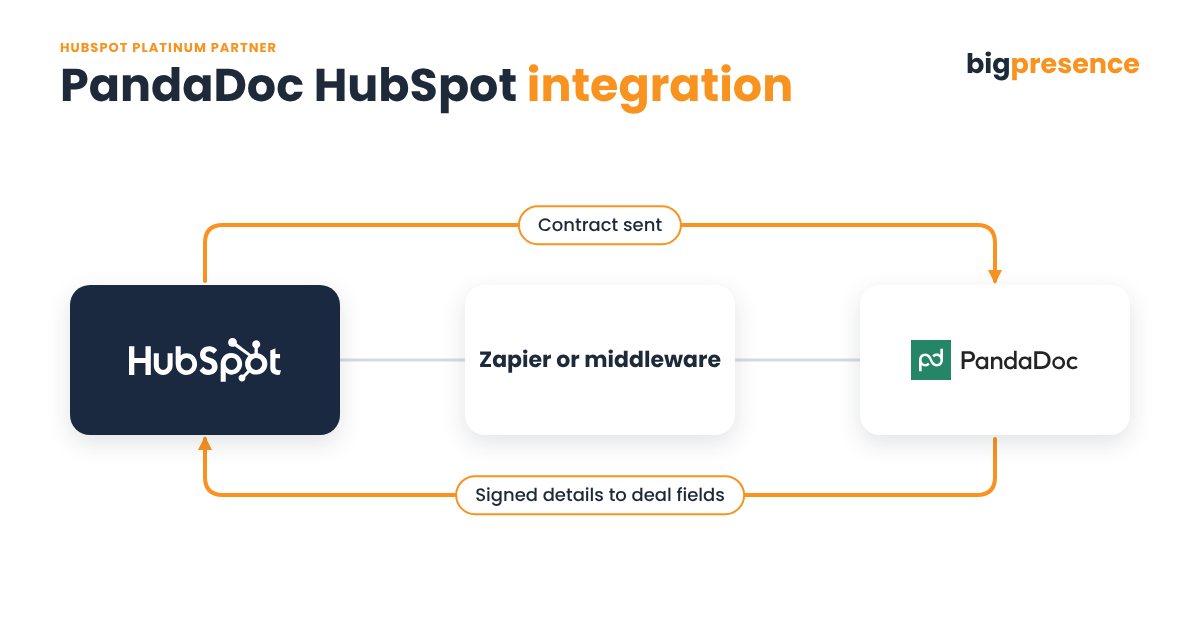
A PandaDoc HubSpot integration brings contract and signature data from PandaDoc back into HubSpot, so nobody retypes what was signed. Big Presence has built a live PandaDoc to HubSpot link through Zapier for a UK client. First, we check PandaDoc’s own HubSpot app, and use Zapier or a custom build where the app stops.
- Who builds it: Big Presence, a HubSpot Platinum Solutions Partner based in Wilmslow, Cheshire.
- How our live build works: it is Zapier based. Contract and signature data moves from PandaDoc to HubSpot through Zapier.
- Native option: PandaDoc’s own HubSpot app can move a deal stage, attach the PDF and update deal properties when a document status changes.
- Price: fixed once scoped. New scope gets a new estimate.
- After launch: ongoing support through a monthly support package.
Last reviewed
Why connect PandaDoc to HubSpot?
Sending a contract is the easy part. However, the trouble starts when the signature lands and HubSpot carries on as if nothing happened:
Deals left in the wrong stage
A client signs, but the deal sits in “contract sent” until someone moves it by hand.
Agreed terms stuck in a PDF
Start dates, options and values live in the signed document, not in HubSpot fields you can report on.
Nothing happens next
Onboarding, invoicing or a welcome email should start on signature. Instead, it waits for a person.
No view of what is out for signature
Managers cannot see which contracts are sent, viewed or stalled without opening another tool.
What data does a PandaDoc HubSpot integration move?
Our live build for a client is Zapier based. Zapier is a tool that links apps with simple “when this happens, do that” steps. The field mapping, however, is agreed with you at scoping.
| From | To | What moves | Direction |
|---|---|---|---|
| PandaDoc | HubSpot | Contract and signature data, through Zapier | Back to HubSpot |
| PandaDoc | HubSpot | Document fields mapped to HubSpot properties, agreed at scoping | Back to HubSpot |
| HubSpot | PandaDoc | Deal, contact and company details into contract templates, using PandaDoc’s own app | One way |
On Zapier, PandaDoc events such as a completed document or a status change can update a HubSpot deal, update a contact or add a contact to a HubSpot workflow.
What does PandaDoc’s own HubSpot app do, and where does it stop?
PandaDoc has its own HubSpot app. For example, it lets you create documents from HubSpot records and fill templates with HubSpot properties. With PandaDoc’s HubSpot automations, a document status can move a deal stage, attach the PDF, update deal properties and update line items.
For many teams, that is enough. However, PandaDoc’s own documentation also sets some limits:
- Sending data back to HubSpot uses PandaDoc’s external automations. These are a paid add-on on the Business plan, although they are included on Enterprise.
- Pulling HubSpot data into documents is not available on PandaDoc’s eSignature plans.
- Documents can only be linked to deals in HubSpot.
- Only text, date, dropdown, checkbox and radio button fields sync back to HubSpot.
- If a value does not fit the HubSpot field type, the automation fails.
The documentation does not describe HubSpot workflows starting from document events, or document events on the HubSpot timeline. So if you need either, we check it at scoping. Where the standard set stops, we fill the gap with Zapier or a custom build. A custom build uses the API, the doorway software uses to read and write data in another system.
How do you send contracts from HubSpot and get the data back?
Scope
First, we look at your contract process, your PandaDoc plan and your HubSpot setup. Then you get a fixed price.
Map
We match each document field to a HubSpot property and agree which events should trigger an update.
Build and test
Next, we build the link and test it with real contracts. Your team then runs user acceptance testing.
Host and support
After go live we monitor the link and keep it working as PandaDoc, Zapier and HubSpot change.
Has Big Presence built a PandaDoc HubSpot integration before?
A UK client
We connected PandaDoc to HubSpot through Zapier for a UK client, so document data reaches HubSpot without being retyped. To be clear, this build is Zapier based. This integration is live.
Why choose Big Presence for e-signature and HubSpot?
We are a revenue operations partner, not just a HubSpot implementer.
HubSpot Platinum partner
We are a HubSpot Platinum Solutions Partner, based in Wilmslow, Cheshire. We deliver HubSpot implementations, CRM integrations and custom development.
The right tool for the job
Zapier where it fits. Custom work through a middleware layer where it does not. So if a platform changes its API, we update the middleware instead of rebuilding.
We stay after launch
Ongoing support runs through a monthly support package, so the link keeps working.
Who hosts and supports a PandaDoc HubSpot integration?
We host it
We host it and look after it. That includes monitoring it, fixing breakages, handling API changes and rotating keys.
You host it
Prefer to own it? We hand over the working code and the repository.
Zapier-based links work differently: they stay in your own Zapier account, and we can support them there. Custom builds, by contrast, use the two hosting options above.
Support comes through a monthly package: Big, Bigger or Biggest. We also help you choose at scoping.
PandaDoc HubSpot integration FAQs
How much does a PandaDoc HubSpot integration cost?
A PandaDoc HubSpot integration typically costs between £3,000 and £8,000 plus VAT when it connects one system to HubSpot, and between £10,000 and £30,000 plus VAT for multi-system builds or complex two-way logic. Most go live in 3 to 8 weeks. We confirm a fixed price once the project is scoped, and new scope gets a new estimate.
How long does it take?
The timeline for a PandaDoc HubSpot integration depends on how many fields and events you need. We give you a timeline after scoping. Every project follows the same path: scope, map the data, build and test, your testing, go live, then ongoing support.
Is PandaDoc’s own HubSpot app enough?
PandaDoc’s own HubSpot app is often enough. If you need deal stage changes, the PDF on the deal and supported field types synced back, start there. We build when you need other fields, other records or events the app does not cover.
Can a signed contract trigger a HubSpot workflow?
Through Zapier, a PandaDoc event can add a contact to a HubSpot workflow or update a deal. PandaDoc’s own documentation does not describe workflow triggers, so we check your exact case at scoping.
Why use Zapier and not a custom build?
Zapier is quick to set up for simple flows, and our live PandaDoc build uses it. For more complex mapping or logic, a custom build through middleware gives more control. We recommend one at scoping.
Does HubSpot have e-signature built in?
HubSpot offers e-signatures on quotes on certain subscriptions. If you already run contracts in PandaDoc, the integration keeps that data in HubSpot. We help you decide which fits.
What do you need from us to get started?
To start a PandaDoc HubSpot integration, we need access to the software, API documentation or credentials, a test account where possible, and information within 5 working days of asking.
Ready to get signed contract data into HubSpot?
Book a scoping call. Then we will look at your contract process and tell you what a PandaDoc HubSpot integration would involve.